

Planting planner: place plants on a satellite map of your yard at the size they'll be
Tap where a tree goes and see its mature canopy drawn to scale on a photo of your own yard, in seven layers, from a catalog of plants that live in Arizona. Free, and no account needed to begin.
What you can do
One map of your property, one panel beside it: find a plant, add it, say whether it is new or already there. The layers below the panel hold what is on the plan.
See the tree at the size it will be
Every tree page says how wide it gets, and nobody can picture twenty feet against their own back fence. Tap the map and the planner draws the trunk where you tapped and the mature canopy around it, on the photo of your yard.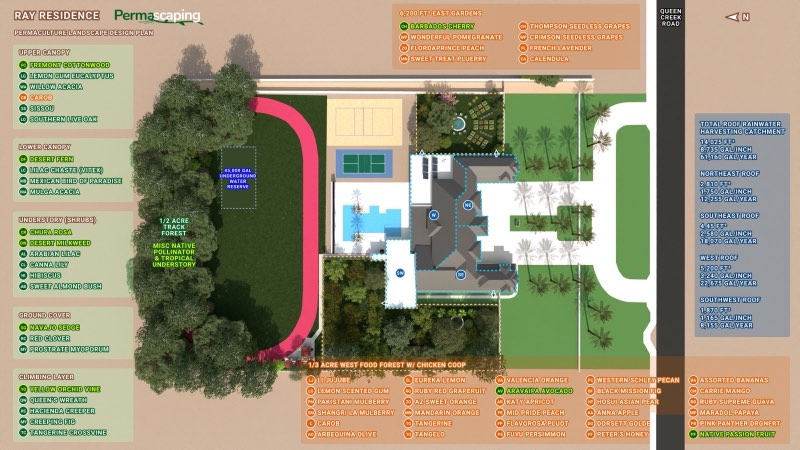
Build in seven layers
Canopy, lower canopy, shrubs, herbs, ground cover, roots and vines, each in its own color. You can see at a glance where the understory is missing and where two canopies will fight.
Choose from plants that live here
The catalog is Arizona plants: natives, fruit trees for the low desert, and this year's wholesale trees with real sizes. Add a program tree and it goes into your preorder as it lands on the map.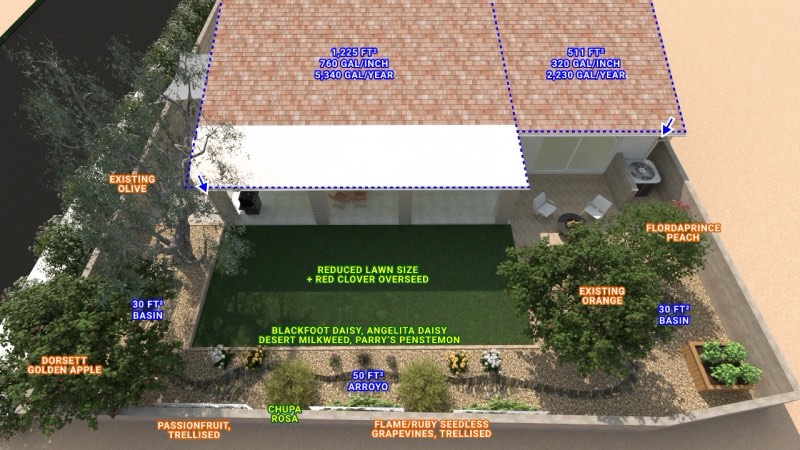
Mark what is already growing
Existing trees go on the plan too, so the shade they throw and the water they drink are part of the picture, not a surprise.Keep it on your device until you sign in
Start without an account and the plan lives in your browser. Create a free account and it moves to your property and follows you to every device.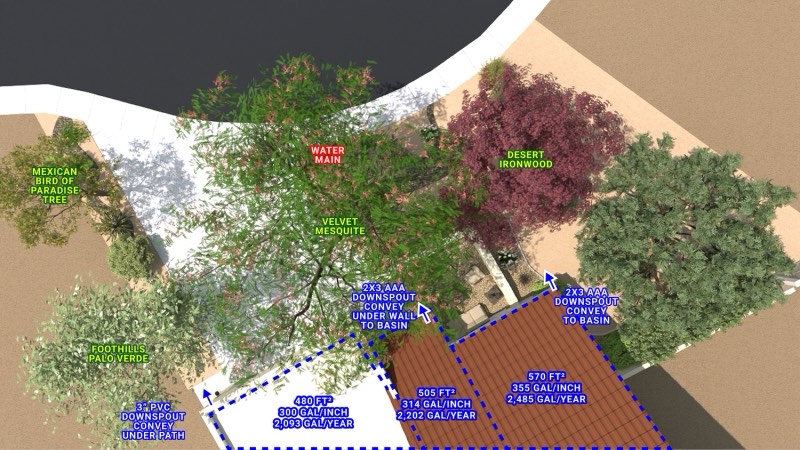
Feed the tree order and the irrigation
The plan is not a drawing. It is the list the wholesale order is built from, and the irrigation planner reads it to suggest the drip zones.
The seven layers
A food forest is seven layers sharing one patch of ground. Each one takes the light, the root depth and the space the others are not using, and the planner colors each one so you can see the gaps.
Upper canopy
The tallest trees. They set the shade everything else lives in, and in the low desert that shade is what makes the rest possible.Lower canopy
Fruit trees kept below the tall ones. Most of this year's program lives here, held to eight or ten feet by summer pruning.Understory and shrubs
Woody plants at head height and below: figs, pomegranates, currants, berries. They fill the gap between trunk and ground.Herbaceous
Soft-stemmed plants that die back and return: herbs, perennial greens, and the flowers that feed the insects doing the pollinating.Soil surface
Living ground cover and the mulch it grows through. This layer is the difference between soil that holds water and soil that bakes.Root layer
What is happening underneath. Deep taproots open the soil, shallow feeders take what the trees leave, and bulbs hold their season underground.Vining
Climbers using somebody else's structure for height: grapes on a trellis, kiwi over a seating area, a vine up a mature trunk.
What you'll know at the end
- Every tree and plant on your lot, new and existing, at mature size
- Where the shade will fall once the canopy grows in
- What can live under each canopy
- A plant list with real sizes, ready to become a wholesale preorder
- Which layers are missing and where two canopies will fight
- The starting point for the irrigation plan
A look at the planner
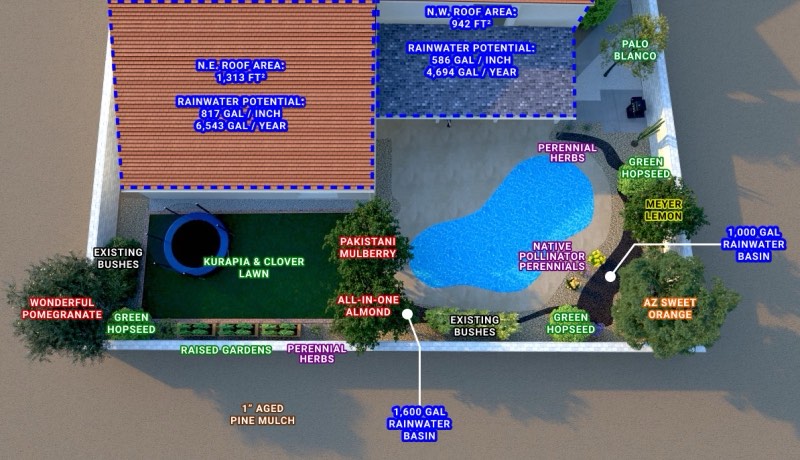
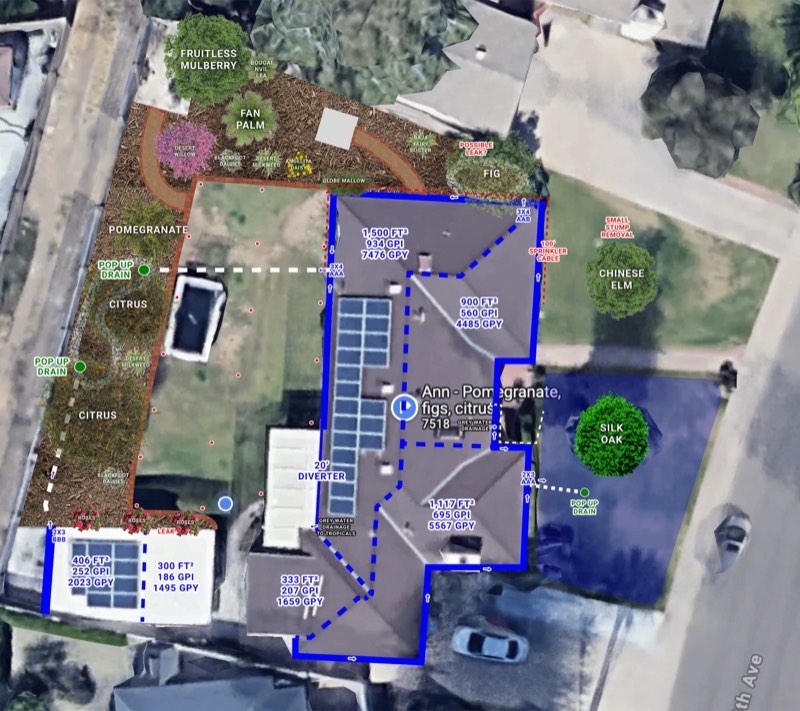
The planting planner draws on top of your own lot, so it opens once it has an address. Here is what a finished plan looks like.
Questions
Do I need an account to use the planting planner?
No. Type your address and start placing plants. The plan is kept in your browser until you create a free account, and then it is saved to your property.
Where do the mature sizes come from?
From the catalog entry for each plant, with the spread we see on Phoenix lots after summer pruning. Program fruit trees are drawn at the height we hold them to, eight to ten feet, not the size they would reach unpruned.
Can I plan with trees I already have?
Yes. Add any catalog plant and mark it as already growing. It is drawn at its mature size so you can see the shade it will throw and plan the understory beneath it.
How does this connect to the wholesale tree program?
When you add one of this year's program trees to the map it goes into your preorder. Preorders are open now and close December 1st, and the trees arrive in January or February.
What about the irrigation?
The irrigation and greywater planner reads this plan and draws suggested drip zones from a valve box to each plant, so the plants and the lines that feed them are designed together.
Request a consultation
Rather have it designed or done for you? Tell us about the property.